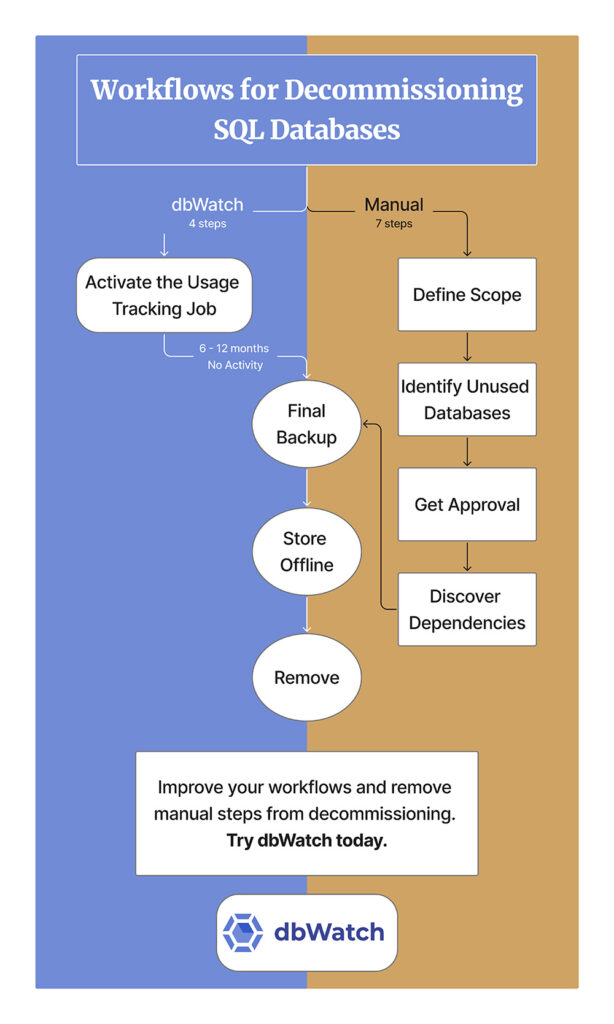





Setting up databases on SQL Server is fast and easy. Someone has a great idea, and database DB-42 is made. Eventually, DB-42 fades out of use. Then, like hundreds of other databases, it needs decommissioning. However, database decommissioning can be like trying to untangle several knots of dependencies during a fire drill.
Let’s start with an example: ten years ago, I helped a client decommission several of their databases. We isolated a set of seemingly unused databases. It was impossible to find owners, so we made many manual usage checks. One of them hadn’t been touched for eight months. We disconnected it and made a backup. Four months later, we heard from a confused scientist asking, “Where is my research?” Once a year, she logged into that database and added the compiled yearly data. We promptly restored the database.
That’s the problem with database decommissioning: It’s easy to prove that a database is used, but surprisingly hard to prove it’s unused. Manual checks can miss seasonal access, background jobs, and service accounts.
We decided there must be a better way to track database activity. So, we built a monitoring job called: database is not in use collector.
While the name’s descriptive, it’s a mouthful. For this article, we’ll call it the Usage Tracking Job. It records all database activity in detail to answer that vital question: Has anyone actually used this database?
Below is a practical database decommissioning checklist for SQL Server: how to prove non-usage with evidence, take a restorable final backup, run an offline grace period, and retire from the database without nasty surprises.
1. Define the Database Decommission Decision
You don’t want to be guessing later, so start by looking at the types of databases you have, then deciding what’s the best course of action for the database types: migrate, consolidate, retire, or archive. Then you’ll want to identify who owns the data, if possible.
If you don’t know who owns the data, don’t panic. It can be that the database was assigned to someone who has left the company or moved to a different department. In cases where there’s no official owner, you simply have to retire or archive unused databases.
No matter if you know the owner, you’ll need to track your actions. Before moving ahead, open a change request with the database name, instance, environment, target date, and the rollback plan.
2. Identify Unused Databases in SQL Server
The goal here is to ensure that, as in the example in the intro, a once-a-year user doesn’t show up. Manually, this involves checking:
- Database memory change
- New logins
- Temp table changes
- Read and write changes
To do this, as well as the dbUseCollector Job, check these points every 10 minutes for a year. We’re joking, that’s not physically possible. You could write your own monitoring job, or just make an educated guess, make a backup, take it offline.
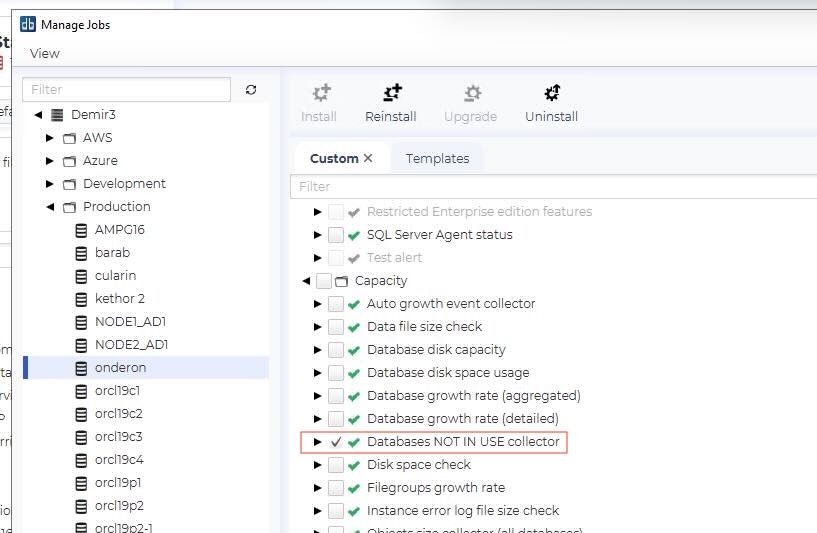
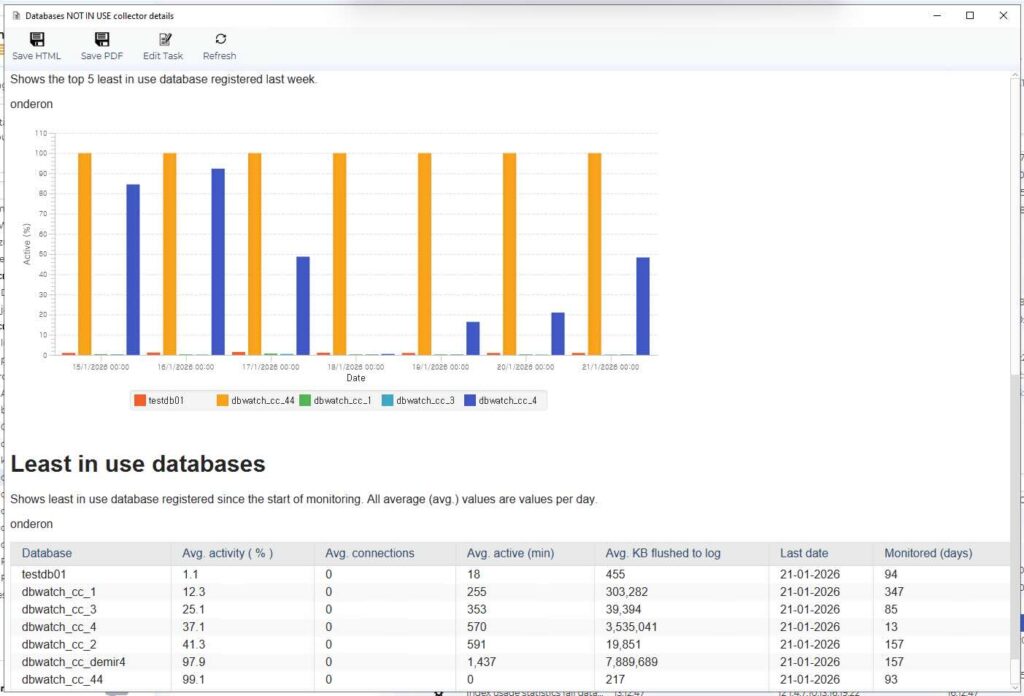
For dbWatch users, simply go to Managed Jobs View and turn on the the Usage Tracking Job, as it’s not enabled by default. Then run it for the set period you decided in Step 1. Review the the Usage Tracking Job report after six to 12 months and confirm no activity. In our experience (anecdotal), after six months of no activity, less than one in ten databases need to be restored; after 12 months less than one in 100 need to be restored. You decide the amount of risk you’d like to take.
You might want to take an ‘evidence snapshot’ of the report to show that there is no activity and add it to the change request (RFC).
Consolidating Databases as Part of a Decommissioning Project
In large SQL Server estates, decommissioning is also one of the steps that makes consolidation possible. Before you move workloads onto fewer servers, you remove the dead weight of unused databases and forgotten dependencies.
With the Usage Tracking Job, turns consolidation from ‘lift and shift everything’ into a triage. You decommission the unused databases, then migrate and consolidate what’s actually in use, with evidence to back up your choices.
3. Get Database Decommission Approval: Ownership Retention and Governance
In a perfect world, you could send an email to the entire company, and all database owners would let you know the names of their databases and what’s on them.
Haha. Many non-tech employees just access an application and don’t realize there’s a database behind it. Others forget they asked for a database to be made. And don’t forget the people who have left the company – it’s highly unlikely ownership of the databases they worked with has been reassigned.
If you find ownership, find out this key information:
- Confirm what they know about the databases
- Annual/seasonal processes
- Regulatory reporting/audits/month-end or year-end routines
- External users, vendors, or integration
- Agree on the retirement decision and sign-off conditions
- How long the database must show ‘no use’ before action
- How long to keep offline but restorable
- Decide retention and archive requirements
- Retention period for backup storage
- Storage location and access control
- Encryption requirements
- Who authorizes restore requests
- What does the final deletion mean after retention
Keep in mind, if you actually find an owner it’s unlikely that you’ll need to delete the database. When someone remembers it, they are usually using it.
4. Discover Dependencies to Catch the Silent Consumers
Even if you don’t find owners or logins, you can still have background usage taking place.
- Searching for SQL statements referring to that database
- Search for SQL Agent jobs like:
- SSIS or ETL pipelines, scheduled tasks, data loads, report subscriptions
- Check for scripts written by ex-employees or consultants that are still running.
- Identify external users, vendors or integrated endpoints
- Check cross-database dependencies such as linked servers
As an alternative, dbCollector Job tracks connections that make changes. If they don’t make changes, you will see that someone connected without taking action, the job doesn’t trace if they are reading data. In theory, it could be possible to track everything, BUT a job with that detail would use too many resources on your system.
We’ll end this section with a bit of humor, a DBA we spoke to for this story cheekily said, “You can just back up and take your whole system offline and restore it as people scream. It’ll be 100% downtime, but you’ll be 100% sure that only used systems are restored.”
5. Make Final Backup for Decommissioning a Database: Verify and Restore Proof
Now’s that the first four steps are complete, it’s time for action.
- Take the system offline
- Take a final full backup, plus required logs, if the company policy requires it, plus all user configuration, privileges and access
- Validate back up integrity, using the organization standard
- Perform a restore validation
Finally, get out that change record you started in #1 and record: backup location, encryption keys, and/or certificates, restore notes and how to restore it.
6. Keep Databases Offline for the Grace Period
Now apply the wait time determined in the stakeholder conversation (or a logical amount of time if there is no owner.) Now simply wait and see if there are access attempts or complaints.
If a request is made, bring things back online. Record who needed it, why, and any further action needed.
7. Remove the Decommissioned Database
You’ve waited for the agreed time, and there’s been no complaint or action. Now it’s time to drop the database and remove all remaining references. If your company keeps inventory or documentation, update it.
Finally, put your final backup into storage for the agreed retention period. Schedule an alert for when the period ends and then deletes backups using the agreed secure process. The last step is to record the destruction of evidence and link it to the original change record.
Database Decommissioning Checklist Recap
If you take only one thing from this checklist, make it this: Make and use that change log. It offers proof that the database was unused over a full business cycle and attaches it to the change record.
When you can show who accessed what and when (or that nobody did), the database decommission conversation stops being guesswork and becomes a controlled change.