

Over time some database environments grow from a few database instances to a large database farm spread over multiple platforms and locations.
These database farms are similar to their agricultural counterparts. Just as farmers once named their animals, Database administrators (DBAs) once could recite the names of their databases. That’s changed. No matter if it’s animals or technology, management has become more complex; when the numbers reach thousands, tracking and maintaining health statistics becomes a serious challenge.
In this blog, you’ll find answers about database farm basics, the main challenges in managing them, and what you need in place to keep them healthy at scale.
What is Database Farm Management?
It’s a term we use at dbWatch for clients who operate at a large scale, typically with around 50 + database instances. While 50 is often where DBAs tend to change from names to numbers, we also have clients with 10,000 or more database instances.
These database instances often sit in different locations, data centers, cloud regions, or customer sites. Most environments include a mix of technologies added over the years.
At this size, the environment becomes more like a large modern farm, with many fields. It’s so big that it’s not realistic to manage everything through individual care and manual routines. You need a complete overview with the ability to group, classify, and monitor database instances, while still having the detail to act on specific problems.
Some people refer to this as a database estate instead of database farm, but the core idea is the same – a very large and diverse collection of databases managed as one system. (and yes, this human learned to write before AI and continues to use the – em dash.)
Database Farm Webinar
Watch: From a few SQL Servers to a full Database Farm
In this webinar, Per Christopher explores the journey from managing a handful of SQL servers to operating vast database farms.
How is database farm management different from instance management?
Individual instance management focuses on the health and performance of individual database servers. It’s about keeping specific instances available and running well.
Database farm management views the entire farm. Instead of tuning each server individually, you think about how to optimize resources, cost, risk, and inventory, etc. for the whole environment.
In farm terms: instance management is checking the health of one cow, while farm management focuses on making sure the whole herd is healthy over time. Both matter, but they work at different levels.
Inventory Management on Database Farms
When you’re managing a database farm, you will need a clear list of everything you have. You should know which servers and instances exist, their locations, and their uses. You should be able to generate up to date reports on all your servers whenever you need them. This helps with internal reporting, budgeting, and audits.
Inventory data also shows which versions and editions you are running. That makes it much easier to plan upgrades and patch cycles, and to see where older versions or unsupported platforms still exist in the environment.
Resource Management for Database Farms
One of the most important areas in database farm management is resource utilization.
A database farm consists of large amounts of expensive and limited resources, such as memory, disk, CPU cores, and software licenses. These resources are a large financial investment, and your job is to ensure the farm is used optimally.
Some useful questions include:
- Do I have servers that are not being used, and can they be decommissioned and the resources returned to the free pool?
- Do I have underutilized servers that we possibly could consolidate to free resources?
- Do all the instances require and use all the memory that has been allocated?
- Do they need and use all the cores they have been allocated?
- Do I have servers that are starved of CPU or memory, that can better use these resources?
- Do all servers with enterprise licenses need enterprise licenses, or is there scope for reducing licenses and cost?
Some sites auto-scale or auto-configure the memory allocated vs used every night. They reduce or increase memory on each instance based on actual use. This improves performance by moving memory where it is needed and can delay the need to invest in new hardware or a new VM cluster.
When all slack resources are removed from the farm, it’s easier to plan for growth. Trend charts can show how the whole database farm is growing in resource usage, providing a solid starting point for planning and budgeting. When you document that you’re using most resources, it should be easier to argue for more.
How Do You Manage SQL Server Farms?
Most teams reach a point in their growth when manual work on each platform is no longer possible. At that stage, you need a central database tool that collects data from every instance and helps you manage the farm as one system.
What to look for in a database tool:
- Monitoring: Monitoring shows you what needs attention. You can set alarm thresholds, so only important notifications are raised. If you’re using a tool, it should help you work proactively, so you can fix issues before they become visible problems.
- Automated Maintenance: Automated maintenance runs and tracks routine jobs such as backups, index maintenance, and DBCC checks on every instance.
- Automated Workflows: Workflows define who is notified and what happens when an issue appears, so problems are handled in a consistent and timely way.
- Management interface: A central management interface lets you act on issues directly. You’ll save time and effort by not logging into each server separately.
- Integration: Send operational data to other systems such as service desks, reporting platform and security, or compliance tools.
- Reporting: Keep managers and customers informed about performance, availability, capacity, and risk. Provide documentation for audits and decisions.
These are the same components you should expect to see when you look at how a specific tool, such as dbWatch, supports database farm management in practice.
Part 2: How dbWatch Supports Database Farm Management
Here is how the above ideas look in practice when you use a database monitoring and management tool, such as dbWatch.
Managing Database Farms in dbWatch
dbWatch gives you both a farm view and an instance view with alerts. At the top level, you see all your database instances in one place, with key information about status, platform, resource usage, and activity.
In the demo below, you can see the dbWatch monitoring view in action. It shows how you can scan the whole farm for issues, then drill down into a specific instance when something needs attention. This gives you a quick health overview across many instances while still letting you investigate details when something looks wrong.
Automated Maintenance
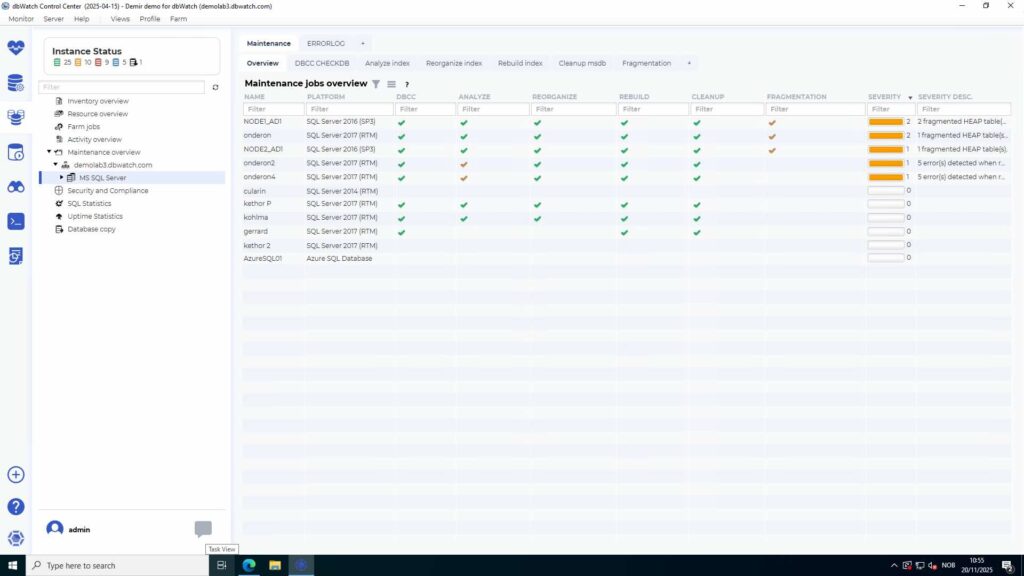
In the Automated Maintenance overview screenshot below, you see how the maintenance jobs are running across the database farm. For each instance, you see key details such as instance name, database platform, and status for the maintenance jobs, with a summary at the end.
You can sort the instances based on several criteria, for example:
- Highest number of errors
- Number of running jobs
- Customer name
This makes it clear where the maintenance jobs are running, where there is a problem, and what should be addressed to make the automation run smoothly.
Many DBAs are aware of the Ola Hallengren scripts. The scripts are solid and widely adopted. However, the challenge is making sure that these maintenance routines run correctly and consistently across the whole database farm. A tool like dbWatch helps you see where jobs fail or are missing, instead of hoping everything’s running.
Database Farm Views and Dashboards
dbWatch Farm Views show you one metric across your entire environment. It’s very useful to see, for example, the total disk usage to know which database instances have too much or too little load.
For example, let’s look at the Farm View of disk capacity.
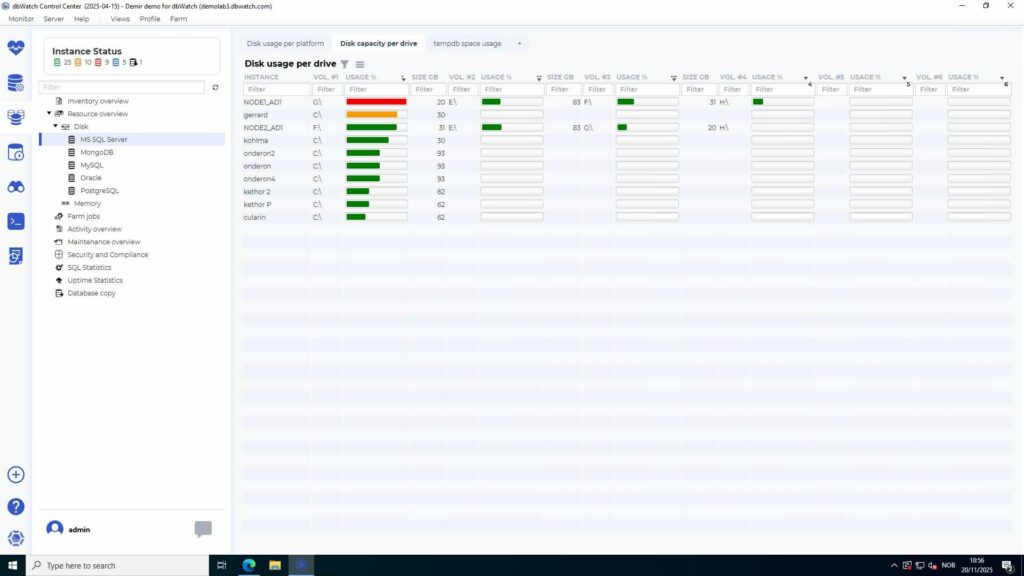
As you can see in the example above, you can identify disks that are approaching full capacity at a glance and act before incidents occur.
Other Farm Views include file, io, database, relative performance, logical reads, page, life expectancy, capacity, views for memory and data cache, etc. They are implemented as queries on top of the database level so they can be adjusted, altered, and supplemented by your own queries.
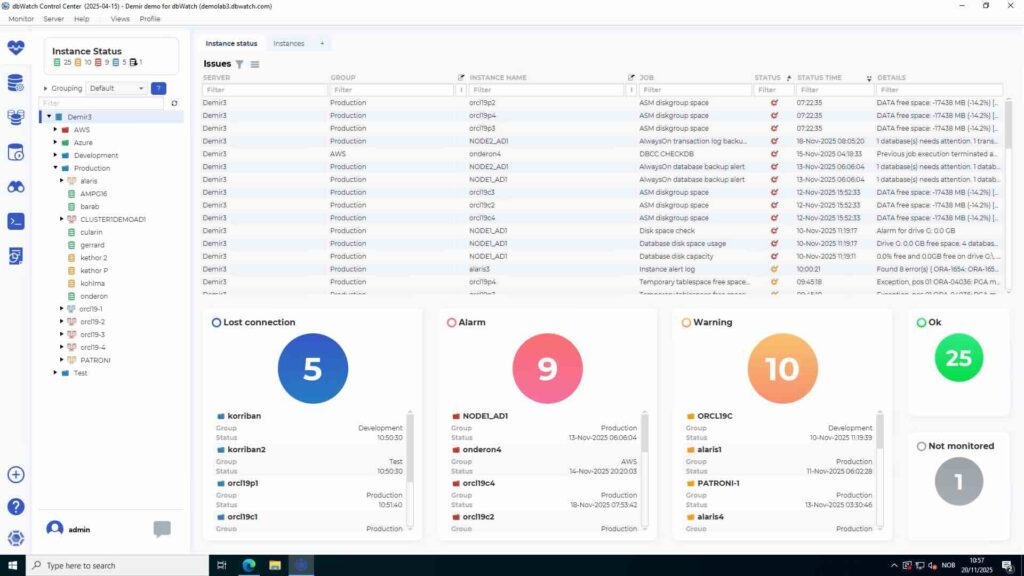
For example, a top-level dashboard (in the screenshot below) is especially useful for managed service providers. The view shows the status of all customer environments, so you can highlight where issues are developing and summarize the health of the farm
Detection and Correction: dbWatch Management Interface
Detecting is the first step, correction is the second. dbWatch is designed to make the workflow easy. You find the problem during monitoring and fix it in the management interface without having to sign into another program, saving time.
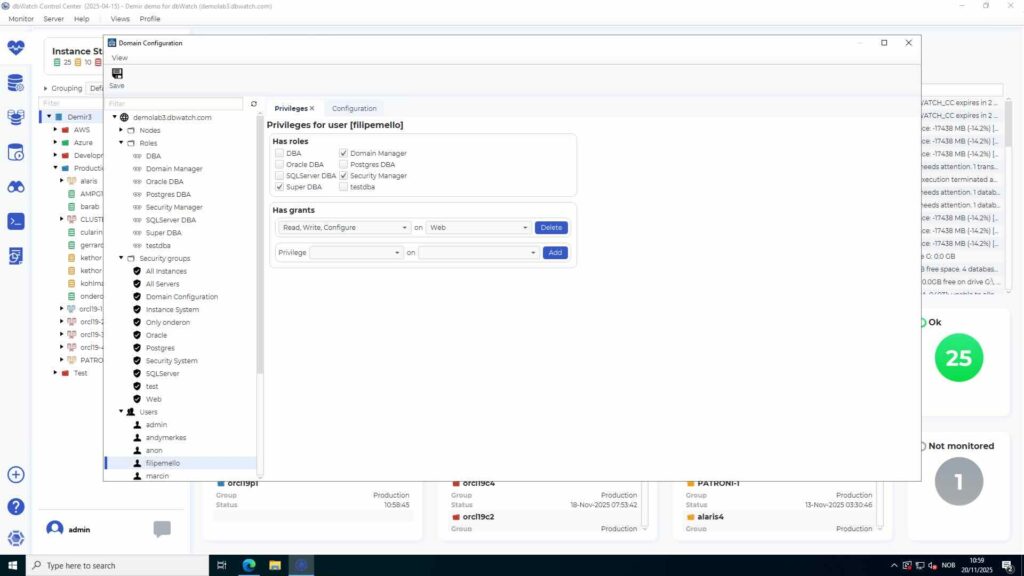
The dbWatch management interface is modular and works together with a modular security engine. Many repetitive tasks can be offloaded from the DBA to either first-line support or developers by giving them read-only access to the database instances.
Access control
Controlling who has access to what is a challenge, especially in larger environments. Developers may need access to development systems so they can handle database work themselves. Others may need read-only access to production so that they can view and see how their queries behave without being able to change data or drop the database.
With dbWatch you can give users access to instances through the tool without giving them database passwords directly. When their work is complete, you can remove their access. The system keeps an audit trail of actions so you can review what was done and confirm that policies have been followed.
Take Control of your Databases
After your environment reaches a certain size, manual checks are no longer enough. At this scale, you need a monitoring and management tool that gives you control of the entire environment in one place. Database farm management helps you get that overview back so you can make decisions instead of reacting to incidents.
dbWatch is made for large and mixed environments and designed to give you a farm-level view with monitoring, management, automation, and dashboards in one place.